What Is WPM in Typing?
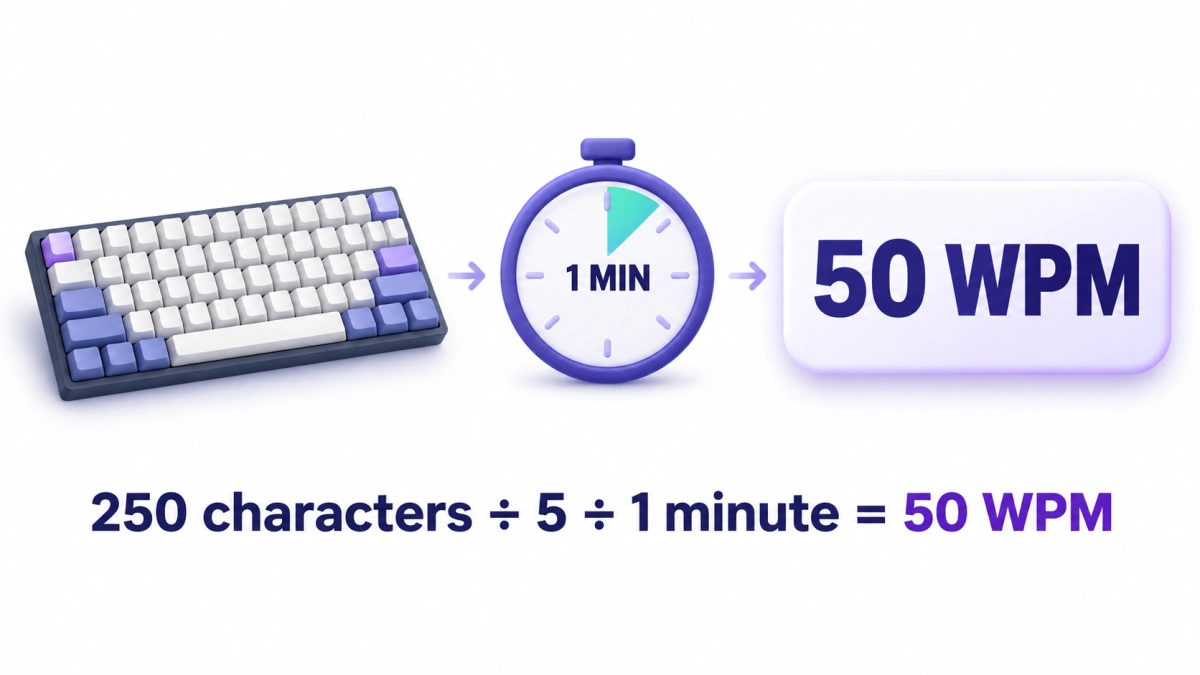
WPM means words per minute and measures your typing speed. Many typing tests count every five characters as one word, including spaces and punctuation. If you type 250 characters in one minute, your speed is 50 WPM before any adjustment for errors.
To calculate WPM, divide the character count by five, then divide by the time in minutes. A 30-second test and a five-minute test can both report WPM because the calculation converts your typing into a per-minute rate.
The examples below show what to count, how to use the formula and why speed should be read alongside accuracy.
On this page
What Counts as a Word in WPM?
A word in a typing calculation is often different from a word in a sentence.
“Cat” and “keyboard” are both single words in everyday writing. But one takes three characters to type and the other takes eight. The five-character method measures the amount of text entered rather than treating every written word equally.
One standard typing word = five characters
Those characters can include letters, numbers, spaces and punctuation.
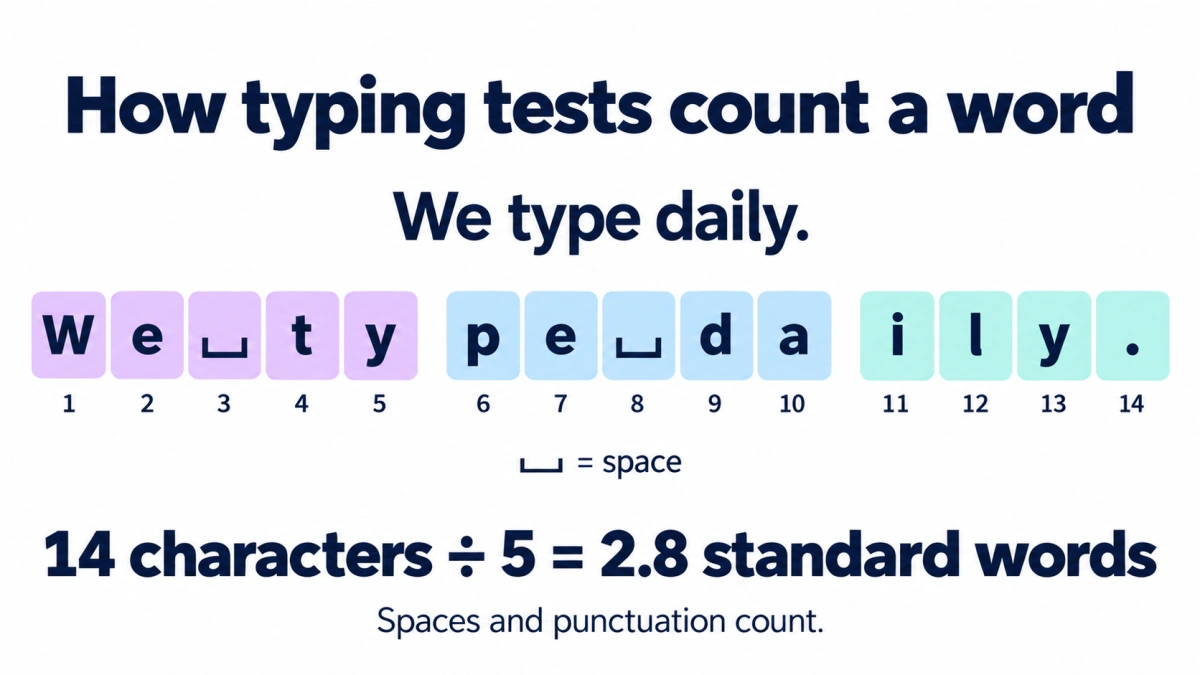
Take this sentence:
We type daily.
| Part | Character count |
|---|---|
| We | 2 |
| Space | 1 |
| type | 4 |
| Space | 1 |
| daily | 5 |
| Full stop | 1 |
| Total | 14 |
The sentence contains three actual words. For the five-character calculation, it contains:
This is why counting the visible words in a passage may give you a different result from the typing test.
Do spaces, numbers and punctuation count?
Yes, under this convention. A space, a digit or a comma each contributes to the character count.
Control keys are different. Do not add every press of Shift or Backspace to the text length. The number of physical keys you press is not necessarily the number of characters the test uses for scoring.
How to Calculate Your WPM
The basic formula is:
Here is what each part means:
| Formula input | What to use |
|---|---|
| Characters typed | The character total counted by the test, including spaces and punctuation |
| 5 | The number of characters in one standard typing word |
| Time in minutes | The measured typing duration expressed in minutes |
Dividing characters by five gives the number of standard words. Dividing that result by the duration gives the number per minute.
Example 1: Calculate WPM for one minute
You type 225 characters in 60 seconds.
First, convert the characters into standard words:
The test lasted one minute:
Your speed is 45 WPM before a separate error adjustment.
Example 2: Calculate WPM for two minutes
You type 480 characters in two minutes.
Now divide by the test duration:
You completed 96 standard words during the test, but your per-minute speed was 48.
A common mistake is to stop after the first calculation and report 96 WPM. That would ignore the two-minute duration.
Example 3: Calculate WPM for 30 seconds
You type 120 characters in 30 seconds.
Thirty seconds is 0.5 minutes, so:
You entered 24 standard words in half a minute. At that pace, the equivalent rate is 48 WPM.
You can try a 30-second typing test to see how a short attempt produces a per-minute score.
Example 4: Calculate WPM for five minutes
You type 1,375 characters in five minutes.
The larger character total does not change the method. Always divide by both the standard word length and the test duration.
WPM Formula When Time Is in Seconds
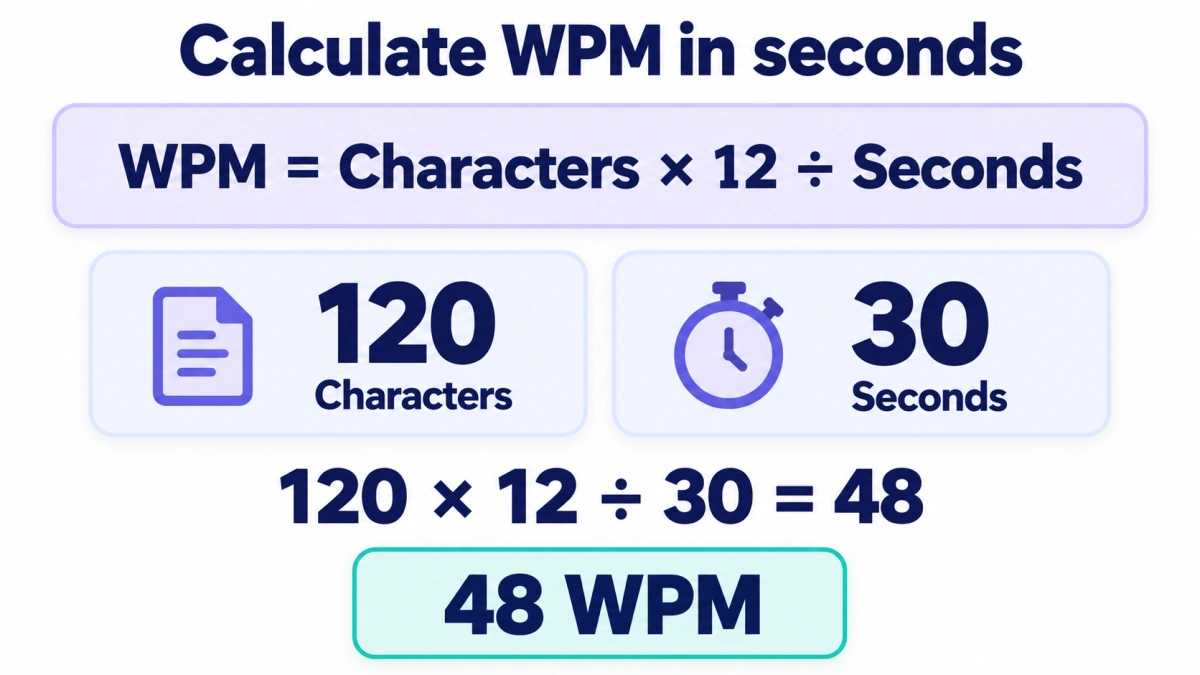
If your time is recorded in seconds, use:
The number 12 comes from dividing 60 seconds by the five-character word length:
For example, suppose you type 165 characters in 45 seconds:
You get the same answer using minutes:
Use whichever formula you find easier. The WPM calculator can help you work with your own character count and duration.
Typing Speed Calculation Table
These examples use the five-character method before any separate error penalty.
| Characters typed | Time | Calculation | Speed |
|---|---|---|---|
| 55 | 15 seconds | 55 × 12 ÷ 15 | 44 WPM |
| 120 | 30 seconds | 120 × 12 ÷ 30 | 48 WPM |
| 165 | 45 seconds | 165 × 12 ÷ 45 | 44 WPM |
| 225 | 1 minute | 225 ÷ 5 ÷ 1 | 45 WPM |
| 480 | 2 minutes | 480 ÷ 5 ÷ 2 | 48 WPM |
| 750 | 3 minutes | 750 ÷ 5 ÷ 3 | 50 WPM |
| 1,375 | 5 minutes | 1,375 ÷ 5 ÷ 5 | 55 WPM |
A higher character total does not automatically mean a higher WPM. Someone who types 480 characters in two minutes has the same rate as someone who types 120 characters in 30 seconds.
Gross WPM and Net WPM: Which Are You Calculating?
The basic character-and-time formula gives a speed before a separate error adjustment. This is commonly called gross WPM.
Net WPM or adjusted WPM accounts for mistakes according to the test’s scoring rules.
| Result | Meaning |
|---|---|
| Gross WPM | Your typing rate before a separate error penalty |
| Net or adjusted WPM | Your typing rate after the test’s error adjustment |
| Accuracy | The proportion of counted typing considered correct |
The important detail is how a test defines an error. An incorrect character and an incorrect word are not interchangeable. Different tools may also treat corrected mistakes differently.
Worked example: Incorrect-word penalty
Suppose a test deducts one standard word for each incorrectly typed word. Its formula can be written as:
You type 840 counted characters in three minutes, with six incorrect words.
- Step 1: Calculate gross speed
840 ÷ 5 ÷ 3 = 56 WPM - Step 2: Calculate the error penalty
6 incorrect words ÷ 3 minutes = 2 WPM - Step 3: Subtract the penalty
56 − 2 = 54 net WPM
Under this scoring method, the result is 56 gross WPM and 54 net WPM.
The six errors in this example are six incorrect words. Do not use an incorrect-character count in the same formula unless the test explicitly defines its penalty that way.
Another method: Calculate speed from correct characters
A tool may instead calculate a rate from correct characters:
For example, if 825 counted characters are correct during a three-minute test:
This method and the incorrect-word penalty can produce different results. Neither formula should be assumed to describe every typing website.
When comparing scores, first check whether both tools report the same kind of WPM.
How to Calculate Typing Accuracy
For a simple character-based calculation:
Suppose you enter 500 counted characters, of which 490 are correct:
This describes how much of the counted typing was correct. It does not tell you how quickly you typed it.
For example:
| Attempt | Correct characters | Total counted characters | Time | Gross WPM | Character accuracy |
|---|---|---|---|---|---|
| A | 490 | 500 | 2 minutes | 50 | 98% |
| B | 490 | 500 | 4 minutes | 25 | 98% |
Both attempts have the same accuracy, but Attempt A has twice the typing rate.
Accuracy methods can differ too. Some systems count mistakes made during the attempt, including those later corrected. Others assess the final text or apply word-based penalties.
Read the typing accuracy guide for more detail about interpreting errors.
Should you multiply WPM by accuracy?
Only when that matches the scoring method you are trying to reproduce.
For example:
This matches a correct-character calculation when the speed and accuracy use the same character totals and duration. It will not necessarily reproduce a score based on incorrect-word penalties.
Why Your Calculation May Not Match the Test Result
If your answer is close to the displayed score but not identical, check these details before assuming the formula is wrong.
1. You counted actual words
A passage with 50 written words does not necessarily contain 250 characters. Use the character count when applying the five-character formula.
2. You left out spaces or punctuation
Leaving out spaces, commas or full stops reduces the character total and therefore the calculated speed.
3. You used the wrong duration
A 30-second test lasts 0.5 minutes. A 90-second test lasts 1.5 minutes. Dividing by 30 or 90 in the minutes-based formula gives the wrong result.
4. The test handles the final word differently
Some systems exclude an unfinished final word. Your manual count may include text that the scoring system leaves out.
5. You compared gross speed with adjusted speed
The basic formula does not reproduce an error-adjusted score unless you also apply the correct error rule.
6. The display rounds the answer
A calculated result of 47.8 WPM might display as 48 if rounded, or 47 if truncated. Calculate with the full values before applying the display rule.
Does a Shorter Test Give You a Higher WPM?
The formula does not award extra speed for choosing a shorter test.
If you type 125 characters in 30 seconds, your rate is 50 WPM. If you type 500 characters in two minutes, your rate is also 50 WPM.
What changes is the attempt itself. A brief hesitation takes up a larger share of a short test, and maintaining a pace for longer can be harder than reaching it briefly.
For example, a three-second pause uses:
- 20% of a 15-second test.
- 5% of a one-minute test.
- 1% of a five-minute test.
Compare results from the same duration and text mode when tracking your progress. A 15-second typing test is useful for a quick attempt, but it does not measure exactly the same situation as a longer session.
Converting WPM to Characters or Keystrokes
Under the five-character convention:
So 45 WPM equals 225 characters per minute.
If keystrokes are counted on the same basis:
That makes 45 WPM equivalent to 13,500 KPH.
This is a unit conversion, not proof of an hour-long performance or a numeric keypad score. For other values, use the WPM-to-KPH converter.
How to Read Your Own Typing Result
After completing a test, note three things together:
- WPM: What typing rate did you achieve?
- Accuracy: How much of the counted typing was correct?
- Test conditions: What duration, text mode and correction settings did you use?
For example, a note such as “48 WPM, 98% accuracy, two minutes, punctuation enabled” is more useful for comparison than “48 WPM” on its own.
Next time, use the same settings. If you change from ordinary sentences to numbers and symbols, treat that as a different practice task rather than a direct comparison.
You can explore related explanations in the typing resources hub.
Questions About WPM
Does 60 WPM mean I typed 60 actual words?
Not necessarily. With the five-character method, it means a rate of 300 counted characters per minute. The number of actual words depends on their length.
Does Backspace count as a character?
Backspace is a control key, not a character added to the passage. Using it takes time, and the test may still record the mistake you corrected. Its effect on the final score depends on the scoring rules.
Can I calculate WPM without a character count?
You need a character count to reproduce the five-character calculation accurately. An actual-word count can give you a literal words-per-minute rate, but it is a different measurement.
Is reading WPM calculated the same way?
Not usually. Reading WPM generally uses the actual number of words read. The five-character convention discussed here is used for measuring typing.
Can WPM tell me how long typing a passage will take?
It can give an estimate for copying text:
A 3,000-character passage at 50 WPM would take:
That assumes a constant pace. Writing new material also takes time for thinking, editing and checking.
Check Your WPM
Take a typing test, then look at the speed, accuracy and duration together. If the test provides a character count, you can use the formula above to follow the calculation yourself.